
Modern software development moves faster than ever. Companies release updates daily, deploy across multiple environments, and must maintain performance, security, and reliability. Manual processes can’t keep up with these demands — that’s where DevOps automation comes in.
DevOps automation combines tools, practices, and cultural philosophies to automate repetitive processes throughout the software development lifecycle (SDLC) — from coding and testing to deployment and monitoring. Its ultimate goal is to enable continuous integration, delivery, and feedback, allowing teams to build and release high-quality software quickly and efficiently.
What Is DevOps Automation?
DevOps automation is the process of applying automation principles to the collaboration between software development (Dev) and IT operations (Ops). It eliminates manual intervention by using scripts, tools, and workflows that handle repetitive or error-prone tasks.
In traditional workflows, development teams write code, hand it off to operations, and wait for deployment or infrastructure provisioning. This creates bottlenecks, miscommunication, and slower releases. Automation bridges this gap by providing a continuous, streamlined process — code moves from development to deployment automatically and safely.
Key Goals of DevOps Automation
- Speed: Accelerate software delivery and reduce release cycles.
- Quality: Catch bugs early and ensure stable deployments.
- Consistency: Maintain predictable and repeatable environments.
- Scalability: Manage large or complex systems with minimal manual effort.
- Collaboration: Unite teams under a shared, automated workflow.
Core Components of DevOps Automation
To understand how DevOps automation works, let’s look at its key components — each addressing a critical stage in the SDLC.
1. Version Control Automation
Version control systems like Git are the foundation of DevOps. They store and track code changes, enable branching strategies, and support collaborative development.
Automation in this stage includes:
- Automated merging and conflict resolution checks.
- Pre-commit hooks for linting and code formatting.
- Triggering continuous integration pipelines upon commit or pull request.
2. Continuous Integration (CI)
Continuous Integration ensures that code changes are frequently integrated into a shared repository and automatically tested.
Automation in CI involves:
- Building source code automatically on every commit.
- Running unit, integration, and regression tests.
- Performing code analysis for quality and security.
- Generating reports for developers in real time.
This reduces integration issues and ensures that every code change maintains system stability.
3. Continuous Delivery (CD)
Continuous Delivery extends CI by automating deployment to staging and production environments. It ensures that software is always in a deployable state.
Automation tasks include:
- Packaging build artifacts automatically.
- Deploying applications to test environments.
- Running automated acceptance tests.
- Creating release candidates without manual intervention.
When configured properly, deployment pipelines can push updates multiple times a day with near-zero downtime.
4. Infrastructure as Code (IaC)
Infrastructure as Code brings automation to the provisioning and management of servers, networks, and other IT infrastructure. Instead of manually setting up systems, teams define infrastructure in code files, which can be versioned, reviewed, and executed automatically.
Automation here includes:
- Provisioning servers, load balancers, and databases on demand.
- Applying consistent configuration across environments.
- Enforcing security baselines and access controls automatically.
- Rolling back to previous configurations when needed.
IaC ensures reliability, reduces drift between environments, and allows quick scaling.
5. Configuration Management
Configuration management tools automate the setup and maintenance of systems. They ensure all environments remain consistent and compliant.
Automation typically includes:
- Installing required software packages automatically.
- Managing environment variables and configuration files.
- Applying updates or patches across multiple systems.
- Verifying that configurations match defined policies.
6. Containerization and Orchestration
Containers encapsulate applications and their dependencies, ensuring consistency from development to production.
Automation plays a key role in:
- Building and pushing container images to registries.
- Automatically deploying containers to environments.
- Scaling container clusters based on demand.
- Monitoring and restarting failed containers.
Orchestration systems manage the lifecycle of containers — automating scaling, updates, and load balancing — ensuring reliability without manual input.
7. Testing Automation
Automated testing validates code quality and functionality at each stage.
Common types of automated tests include:
- Unit tests: Validate individual components.
- Integration tests: Check interactions between modules.
- Functional tests: Ensure business logic correctness.
- Performance tests: Measure speed and scalability.
- Security tests: Detect vulnerabilities early.
Automating these tests ensures continuous feedback and reduces the risk of releasing faulty code.
8. Monitoring and Feedback
Automation doesn’t stop after deployment. Monitoring tools automatically track performance, uptime, and user experience.
Automation in this phase includes:
- Generating alerts based on defined thresholds.
- Auto-scaling infrastructure in response to traffic spikes.
- Automatically rolling back failed deployments.
- Creating reports for trend analysis and optimization.
The feedback from these systems feeds back into the development cycle, closing the DevOps feedback loop.
Benefits of DevOps Automation
Automation transforms not just technical processes but also how teams collaborate and deliver value.
1. Faster Time-to-Market
By eliminating manual steps, teams can deliver updates and new features faster. Continuous integration and deployment pipelines enable daily or even hourly releases.
2. Enhanced Consistency
Automation ensures identical processes across environments, reducing “works-on-my-machine” problems. Code, infrastructure, and configurations behave consistently from development to production.
3. Improved Reliability
With automated testing, deployment validation, and rollback capabilities, releases become safer and less error-prone. Failures can be detected and fixed automatically.
4. Greater Efficiency
Teams spend less time on repetitive tasks and more time on innovation. Automation handles builds, tests, deployments, and monitoring — freeing human effort for creative problem-solving.
5. Reduced Costs
Automation reduces manual labor, shortens downtime, and minimizes human errors that lead to costly rollbacks or rework.
6. Stronger Security
Automated security checks, compliance audits, and vulnerability scans ensure that potential threats are detected early and remediated continuously.
7. Scalability and Flexibility
Automated systems scale seamlessly as workloads grow. Infrastructure as Code and container orchestration allow dynamic scaling without downtime.
Key Tools and Technologies in DevOps Automation
While specific tools vary by organization, certain categories are essential in any automated DevOps ecosystem.
1. CI/CD Tools
These manage build and deployment pipelines:
- Jenkins
- GitLab CI/CD
- CircleCI
- Azure DevOps
- GitHub Actions
2. Infrastructure as Code (IaC)
Tools that automate provisioning and configuration:
- Terraform
- AWS CloudFormation
- Ansible
- Chef
- Puppet
3. Containerization and Orchestration
To automate application packaging and scaling:
- Docker
- Kubernetes
- Helm
- OpenShift
4. Automated Testing Tools
- Selenium
- JUnit / NUnit
- Cypress
- Postman (for API testing)
5. Monitoring and Logging
For automated observability and feedback:
- Prometheus
- Grafana
- ELK Stack (Elasticsearch, Logstash, Kibana)
- Datadog
6. Collaboration and Version Control
- Git
- Bitbucket
- GitHub
- GitLab
These tools form the automation backbone — but the success of DevOps depends less on the toolset and more on process design and cultural alignment.
DevOps Automation Pipeline: Step-by-Step
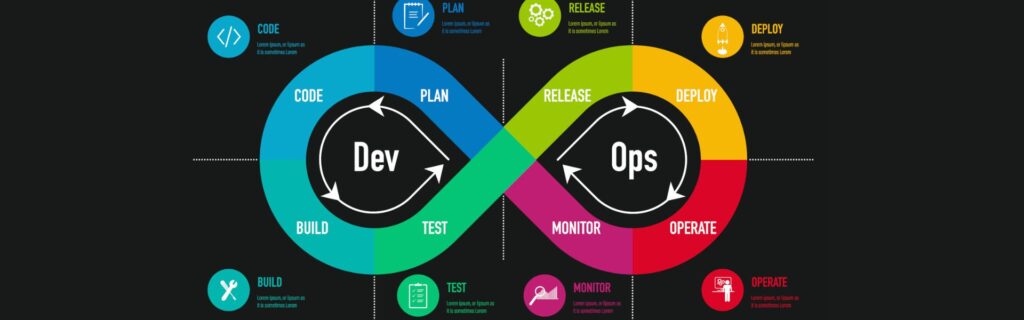
A typical DevOps automation pipeline can be visualized as a continuous loop that integrates development and operations:
Step 1: Plan
The process begins with planning — defining user stories, backlog items, and release goals. Tools like Jira or Trello can automatically generate tasks and track progress.
Step 2: Code
Developers write code in repositories like Git. Commits trigger automated build processes, static code analysis, and pull-request reviews.
Step 3: Build
The automation server compiles and packages the application. It may also build Docker images or prepare deployment artifacts.
Step 4: Test
Automated tests validate the new build, ensuring quality and stability before moving forward.
Step 5: Release
Upon successful testing, the pipeline promotes the build to a staging or pre-production environment automatically.
Step 6: Deploy
With continuous deployment enabled, the system pushes the release to production automatically or with a manual approval gate.
Step 7: Operate
Monitoring tools track performance, detect anomalies, and alert teams. Infrastructure auto-scales based on demand.
Step 8: Feedback
Metrics from monitoring feed back to developers, informing bug fixes, improvements, or feature changes.
This loop repeats continuously — ensuring constant improvement and rapid delivery.
Best Practices for Successful DevOps Automation
Automation is powerful, but success requires thoughtful implementation. Below are proven best practices.
1. Automate Incrementally
Avoid automating everything at once. Start with high-impact tasks — such as CI builds, test execution, or deployments — and expand gradually.
2. Standardize Processes
Document your workflows and define automation standards. Consistency ensures reliability across teams and projects.
3. Use Infrastructure as Code
Always define environments programmatically. Version control your infrastructure the same way you do application code.
4. Incorporate Security Early
Integrate security scanning and compliance checks into CI/CD pipelines — a practice known as DevSecOps.
5. Monitor Everything
Establish visibility across pipelines, systems, and applications. Use alerts, dashboards, and logs for continuous feedback.
6. Prioritize Testing Automation
Ensure your automated tests cover as many use cases as possible. A robust testing suite forms the foundation of reliable automation.
7. Maintain Clear Rollback Strategies
Automation should always include rollback procedures — such as blue-green deployments or snapshot restoration — to ensure resilience.
8. Foster Collaboration and Shared Responsibility
DevOps automation works best when teams share ownership of both code and infrastructure. Encourage cross-functional learning and transparency.
Challenges in DevOps Automation
Despite its benefits, automation introduces challenges that organizations must address strategically.
1. Tool Overload
Using too many tools can create integration complexity. Select tools that align with your ecosystem and centralize management.
2. Cultural Resistance
Automation can face pushback from teams accustomed to manual control. Building trust and showing tangible benefits are key to adoption.
3. Security Risks
Automating deployments or infrastructure without proper access controls can expose vulnerabilities. Implement role-based permissions and auditing.
4. Complexity at Scale
Large systems with multiple environments and microservices require careful orchestration. Monitoring, dependency mapping, and consistent policies help mitigate this.
5. Maintenance Overhead
Automated systems need maintenance — pipelines, scripts, and infrastructure definitions require regular updates to stay effective.
Metrics to Measure DevOps Automation Success
To evaluate the impact of automation, track measurable performance indicators:
- Deployment Frequency: How often code reaches production.
- Lead Time for Changes: Time between code commit and deployment.
- Change Failure Rate: Percentage of deployments that cause issues.
- Mean Time to Recovery (MTTR): How fast failures are detected and resolved.
- Automation Coverage: Proportion of manual tasks that have been automated.
- Test Pass Rate: Percentage of automated tests passing in CI/CD pipelines.
- System Uptime: Impact of automation on stability and availability.
Monitoring these KPIs helps refine processes and justify automation investments.
Future Trends in DevOps Automation
Automation continues to evolve alongside emerging technologies and methodologies.
1. AI-Driven Automation
Artificial intelligence and machine learning are enhancing predictive analytics, anomaly detection, and automated decision-making in DevOps workflows.
2. GitOps and Policy-as-Code
GitOps extends Infrastructure as Code by using Git repositories as the single source of truth for deployments, combined with automated policy enforcement.
3. No-Ops Environments
Cloud platforms increasingly offer serverless and self-healing infrastructure, minimizing manual operations through intelligent automation.
4. Edge and Multi-Cloud Automation
As businesses adopt hybrid and multi-cloud strategies, automation is becoming crucial for provisioning, security, and synchronization across distributed environments.
5. Continuous Verification
Automated verification and validation — through synthetic monitoring and real-time feedback — ensure post-deployment reliability.
Conclusion
DevOps automation is not just a technical upgrade; it’s a shift in how organizations think, collaborate, and deliver value. By automating repetitive tasks, maintaining consistency, and integrating continuous feedback, teams achieve faster, safer, and more reliable software delivery.
When implemented thoughtfully — combining the right tools, clear processes, and a collaborative culture — automation transforms DevOps into a truly continuous, intelligent, and scalable ecosystem.
The future of software delivery lies in autonomous pipelines, intelligent monitoring, and self-healing systems — all driven by the foundation of DevOps automation.