Orbit by Launchpad Innovations: A Full AI Content Team That Lives Inside GoHighLevel
If you run a small business, you already know how much time content takes. You need a plan. You need social posts every week. You need blogs for your website. You need your brand to look and sound the same everywhere. And on top of all that, you need your sales team to do well on calls. That is a lot of work for a team that is already busy serving customers.
Most AI writing tools promise to help, but they all start the same way. You get an empty box. You type in who you are, what you sell, who you sell to and how you like to sound. Then you do it again tomorrow. And the next day. And the results still read like they could belong to any business in the world.
Orbit was built to fix that. Orbit is a team of five AI agents made by Launchpad Innovations, and it lives right inside your GoHighLevel sub account. It reads the brand board and brand voice you have already set up, and every agent writes from that same place. You set it up once. After that, five agents write strategy, social posts, blogs and brand playbooks in your voice, and one of them even scores your sales calls.
In this post, we will walk through what Orbit is, how it works, and what each agent actually gives you.
The Problem With Most AI Writing Tools
Before we get into Orbit, it helps to look at why so many businesses give up on AI tools after a few weeks.
The first problem is repeat work. Every time you open a new tool or a new chat, you have to explain your business again. If you forget a detail, the result comes out wrong. If a new team member uses the tool, they explain it a different way, and the result changes again.
The second problem is that nothing connects. Your strategy lives in one tool. Your social posts come from another. Your blog comes from a third. None of them talk to each other, so your messages drift apart over time.
The third problem is that most tools stop at writing. They do not help you see what happens after a lead calls you. You can make great posts and still lose deals on the phone without ever knowing why.
Orbit deals with all three. It already knows your brand, its agents work from the same source, and it follows the work all the way to your sales calls.
What Orbit Is
Think of Orbit as a small content team that already knows your business on day one.
It pulls your colours, fonts and logos from your brand board in GoHighLevel. It pulls your tone, your audience and your writing rules from your brand voice. Every agent uses this same information. That means your strategy, your posts, your blogs and your brand rules all match, because they all come from one place.
There is no new login to remember and no new app to learn. You click Orbit in your GoHighLevel menu, and it already knows which business you are. It loads your brand and gets ready to work. Everything the agents make is saved to your own library, so nothing gets lost and nothing gets mixed up with another business.
The five agents are Nova, Echo, Root, Axis and Vox. Here is the short version of what they do.
- Nova sets the strategy.
- Echo turns that strategy into social posts.
- Root turns it into long blog articles.
- Axis writes down the rules of your brand.
- Vox coaches your team on the sales calls that come in.
They are not five separate tools stuck together. They are five ways of looking at the same brand.
Opening Orbit for the First Time
When you click Orbit in your GoHighLevel menu, you land on the dashboard. Your brand name sits at the top, so you always know which business you are working on. This is very useful if you manage more than one location.
Each agent has its own card. Every card has a small picture, a short line about the agent's job and a few tags that show what it makes. If you want to learn more about an agent, click its card. If you are ready to go, click its run button.
On the right side, you will see a token rail. This shows how much you have used this month, so you always know where you stand.
The menu at the top stays with you on every screen. It has Home, all five agents and your Library. No matter where you are inside Orbit, you are always one click away from where you want to go.
Nova: Your Strategy Agent
Nova is the agent you run first, because everything else builds on it.
Nova looks at your brand board, your brand voice and your market, and gives you a clear plan for your marketing. The best part is that you do not have to fill in a form. Nova already has everything it needs from your brand, so you just click run.
Here is what Nova gives you back.
At the top, there is a short overview of your strategy and one line that sums up where your brand stands in the market.
Next, it shows the chances you have to grow and the risks you should watch out for. Each one sits on its own card, so they are easy to read and easy to share with your team.
Then it breaks your audience into groups. For each group, it lists what they struggle with and what they want to achieve.
After that, it gives you the main themes, or pillars, to build your content around. These keep your posts and blogs focused instead of random.
On the side, Nova shows which channels to use, how often to post and which numbers to keep an eye on.
Most people end up using the audience part every single day. Each audience group comes with one message that works best for them. You can copy that message straight into an email, an ad or a campaign. It takes the guessing out of knowing what to say to who.
Echo: Your Social Media Agent
Once Nova has set the plan, Echo turns it into posts you can actually publish.
Echo starts by asking you one simple question. Which platforms do you want posts for? You can turn on Facebook, Instagram and LinkedIn.
Here is where Echo is different from most tools. It writes for each platform on its own. It does not write one post and copy it to every channel. Your LinkedIn post reads like something made for LinkedIn. Your Instagram post reads like something made for Instagram. Each one fits how people use that app.
Every post comes with everything you need.
- The full caption.
- Hashtags.
- Text to place on top of the image.
- ALT text for the image, so your posts are easier to use for people with screen readers.
- A good day and time to post it.
Your posts are grouped by platform, and each card has a link to see more details. If you want to see your whole week at once, you can switch to calendar view. When you are happy with the set, you can send all of it to the Launchpad social planner in one click. No copying, no pasting, no jumping between tabs.
Echo also gives every post in the set the same image prompt. This keeps your visuals looking like they belong together, instead of each post having its own random style. Over time, that is what makes a feed look like a real brand.
Root: Your Blog Agent
Social posts get attention, but blogs help people find you on Google and help them trust you. Root is the agent that writes your longer articles.
Before Root starts writing, it asks for three things.
- The topic of the blog.
- The main keyword you want to show up for.
- The angle you want to take.
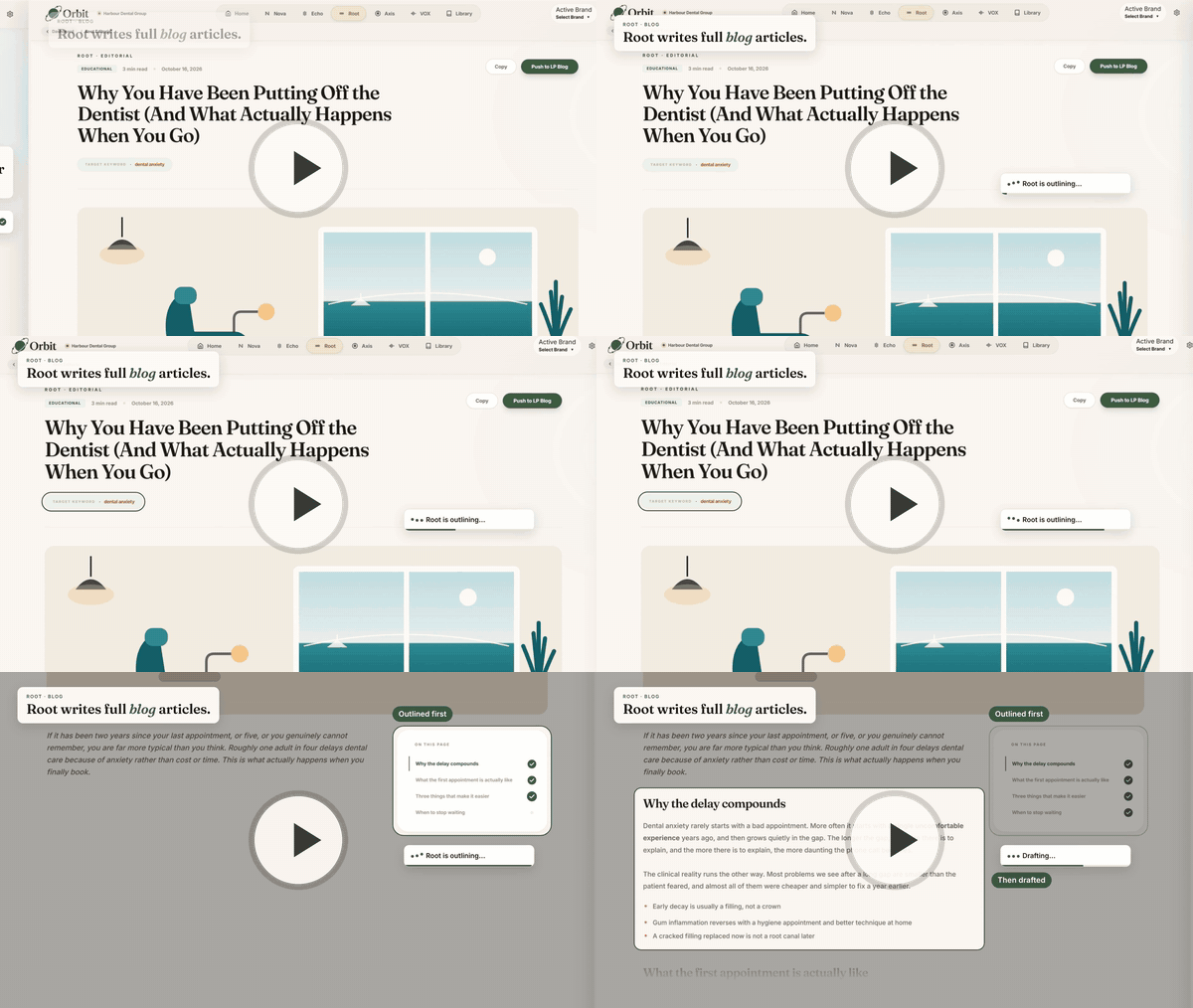
Then Root does something many writers skip. It plans the outline first. Only once the structure is right does it start on the main text. This means you do not end up with a long article that wanders off topic or misses the point.
What you get back is a finished article, not a rough draft. It has a title, a category, a read time and the keyword it targets. There is a list of sections down the side, so readers can jump to the part they care about. The text is set up for the web, with clear headings and short paragraphs, not dumped in as one giant block.
When the blog is ready, you can push it to your Launchpad blog with one click. It goes live without any copy and paste.
Axis: Your Brand Playbook Agent
Axis is a little different from the others. It does not make marketing. It makes the rules your marketing follows.
Axis reads your brand board and writes a full brand playbook. This is the kind of document an agency would usually charge a large fee to put together, and Axis builds it for you from what you already have in GoHighLevel.
The playbook has seven parts, and you can move between them using the menu on the side.
- Brand identity.
- Logo system.
- Colour system.
- Typography.
- Voice and tone.
- Iconography.
- UI patterns.
Each part is exact. You do not get vague advice like "use warm colours." You get the real colour codes, the real font names and real examples of how your brand should look and sound. The top of the playbook also shows your brand name, your tagline, your brand promise, a summary of your audience and tags that describe your tone.
The voice and tone part is worth a closer look. It shows phrases that fit your brand and phrases that do not. If you ever hire a new team member, work with a freelancer or bring on a new agency, this is the quickest way to get them writing the right way from day one.
You can save the playbook as a PDF or as a slide deck, so it is easy to share.
Vox: Your Sales Call Coach
Great marketing brings in leads. But what happens when those leads pick up the phone? That is where Vox comes in.
Vox is the only agent that looks at what happens after your marketing works. It pulls your recorded calls from Launchpad and scores each one against a scorecard that you have approved. Then it turns those scores into simple coaching your team can use.
Managers get a full view of the team. The main part is the coaching queue, which explains why each call needs a look. A call might be there because it scored below your set level. It might be a good call that was held back by one weak spot. Or it might be there because a rep does not agree with their score.
Next to the queue, managers can also see:
- The best call of the period, and what the rep did well on it.
- The one skill the whole team needs to work on most.
- How scores are spread across the team.
- A table for each rep, with trends over time.
- The objections that came up most often on calls.
Reps get a different view. They see their own calls, their own wins and the one thing to fix on their next call. This keeps coaching simple and personal, instead of a long list of problems.
Vox runs in the background, so a long call never slows down your browser. You can also have a weekly report sent to you on its own, so you stay on top of your team without having to log in and dig around.
There is one important rule. Vox will not score any call until someone at your business confirms that calls are recorded legally and that people on the call are told they are being recorded. That step is saved with a name and a time, so there is always a clear record. Vox also has its own full guide, since it has its own screens and its own setup.
Your Content Library
Everything Orbit has ever made for your business is saved in your Library on its own. You never have to remember to save anything.
You can filter the library by agent or by date, so finding last month's blog or last week's social posts takes seconds.
When you open an old item, it opens the same way it first looked. A Root blog opens as a blog. An Echo set opens as post cards. A Nova strategy opens as a strategy. You never have to make something again just to look at it, which saves both time and tokens.
Settings and AI Keys
The Settings page is where you manage your brand connections and, if you want, your own AI accounts.
At the top, you can see your brand board and brand voice connections. Below that is a list of AI providers. Each one shows a simple status, so you know if it is connected or missing. For safety, Orbit only ever shows the last four characters of a stored key, never the full key.
Under that is AI Routing. Here you get one row for each agent. You can choose which AI provider and which model each agent uses, plus a backup. If the first provider has a problem or hits a limit, Orbit tries the backup and makes a note that it did. Your work keeps moving.
What you can change depends on your role in GoHighLevel. Orbit checks this for you, so there is nothing extra to set up. Both admins and users can view providers, add a key and change routing. Only admins can replace or delete a key.
You also get to choose which key pays for each run.
- On Auto, which is the default, Orbit uses your key if you have one for that provider, and the shared Launchpad key if you do not.
- On Location, Orbit always uses your key. If your key is missing or not working, the run stops instead of quietly charging Launchpad.
- On Launchpad, Orbit always uses the shared Launchpad key, even if you have your own.
A small badge on each row shows which key will be used right now, so there is never any guessing.
There is also a Test button to check that a key works. It sends a very small real request to the provider. It costs only a tiny part of a cent, but that cost goes to whoever owns the key, so it is good to know before you click it.
A Simple Example of Orbit in Action
Let us say you run a med spa. On Monday, you open Orbit and run Nova. In a few minutes, you have a clear plan, your main audience groups and the message that works for each one.
Next, you run Echo for Instagram and Facebook. You get a full week of posts, each with captions, hashtags, image text and the best time to post. You look over the calendar, make a small change or two, and send the set to the social planner.
Then you run Root for a blog on a treatment your clients ask about most. You give it the topic, the keyword and the angle. Root plans the outline, writes the article and you publish it to your blog in one click.
If you are bringing on a new front desk person, you share the Axis playbook so they know how your brand talks.
At the end of the week, Vox sends you a report showing which calls went well, where your team lost bookings and what to coach on next.
One place. One voice. Much less time.
Why Orbit Matters for Your Business
Good content takes time, and most growing teams do not have much of it. Orbit gives you a strategy, social posts, blogs, a brand playbook and call coaching, all from inside the GoHighLevel account you already use. Every piece sounds like you, because every agent starts from the same brand.
Orbit is one more way Launchpad Innovations helps growing businesses run everything from one place. Launchpad brings together your CRM, marketing, scheduling, AI agents and a real team of people who help you build and grow. You are not left alone with software and a login. You get daily office hours, help when you need it and specialists who build your automations, campaigns and pages with you.
Whether you run a clinic, a consulting firm, a contracting business or a local service company, Launchpad is built for growing companies, not big IT departments.
Want to see Orbit working on your own brand? Book a demo with Launchpad Innovations at launchpadinnovations.ai and start your 14 day free trial today.
Frequently Asked Questions
Orbit is a team of five AI agents made by Launchpad Innovations. It lives inside your GoHighLevel sub account and reads the brand board and brand voice you already set up. From there, it writes your strategy, social posts, blogs and brand playbook in your own voice. It also scores your sales calls, so you can see what happens after your marketing brings in leads.
No. Orbit does not need a new login or a new app. You simply click Orbit in your GoHighLevel menu, and it opens right there. It knows which business you are and loads your brand on its own. Everything the agents create is saved to your own library, so your work stays organised and never gets mixed up with another business or location.
Most AI tools start with an empty box, so you explain your business every single time. Orbit already knows your brand because it reads your brand board and brand voice from GoHighLevel. All five agents work from that same source, so your strategy, posts, blogs and brand rules always match. You set it up once, and every agent writes in your voice.
Nova is the strategy agent and the one you run first. It needs no form because it already has your brand details. Nova gives you a short overview, your chances to grow, the risks to watch, your audience groups and the main themes for your content. It also shows which channels to use, how often to post and which numbers to track.
Echo writes posts for Facebook, Instagram and LinkedIn. You pick the platforms you want before it starts. Echo writes for each one on its own, so your LinkedIn post reads differently from your Instagram post. Every post comes with a caption, hashtags, image text, ALT text and a suggested day and time. You can then send the full set to the Launchpad social planner in one click.
Root asks for three things first: the topic, the main keyword and the angle. Then it plans the outline before writing the main text, so the structure is right from the start. You get a finished article with a category, read time, target keyword and a section list. When you are happy, you can publish it to your Launchpad blog with no copy and paste.
Axis reads your brand board and builds a full brand playbook in seven parts: brand identity, logo system, colour system, typography, voice and tone, iconography and UI patterns. It gives real colour codes, real font names and real examples of words to use and avoid. You can save it as a PDF or slide deck and share it with new staff or freelancers.
Vox pulls your recorded calls from Launchpad and scores each one against a scorecard you approved. Managers see a coaching queue, the best call of the period, the team's weakest skill, rep trends and common objections. Reps see only their own calls, their wins and one thing to fix next. Vox runs in the background and can send you a weekly report automatically.
Recording calls the right way is your responsibility. Vox will not score any call until someone at your business confirms that calls are recorded legally and that everyone on the call is told. That confirmation is saved with a name and a time, so you always have a clear record. This adds a simple, clear check before any call scoring begins.
Yes. In Settings you can add your own AI provider keys and choose a provider, model and backup for each agent. On Auto, Orbit uses your key if you have one, otherwise the Launchpad key. On Location, it always uses yours. On Launchpad, it always uses the shared key. Orbit only ever shows the last four characters of any stored key.
See Orbit on your brand.
Book a demo and watch all five agents run on your business in real time. 14 day free trial, no credit card.